Set 객체
Set 객체는 중복되지 않는 유일한 값들의 집합(set)이다.
Set 객체는 배열과 유사하지만, 다음과 같은 차이가 있다.
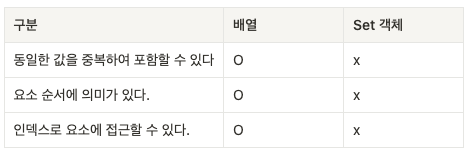
Set 객체의 특성은 수학적 집합의 특성과 일치한다.
Set은 수학적 집합을 구현하기 위한 자료구조다.
Set을 통해 교집합, 합집합, 차집합, 여집합 등을 구현할 수 있다.
1. Set 객체의 생성
Set 객체는 Set 생성자 함수로 생성한다. Set 생성자 함수에 인수를 전달하지 않으면 빈 Set 객체가 생성된다.
const set = new Set()
console.log(set) //Set(0) {size: 0}
Set 생성자 함수는 이 터러블(반복 가능한(iterable, 이 터러블) 객체는 배열을 일반화한 객체)을 인수로
전달받아 Set 객체를 생성한다.
이때, 이 트러블의 중복된 값은 Set 객체에 요소로 저장되지 않는다.
const set1 = new Set([1,2,3,4])
console.log(set1) //Set(4) {1, 2, 3, 4}

const set2 = new Set('hello')
console.log(set2) //Set(4) {'h', 'e', 'l', 'o'}
중복을 허용하지 않는 Set 객체의 특성을 활용하여 배열에서 중복된 요소를 제거할 수 있다.
// 배열의 중복 요소 제거
const uniq = (array) => array.filter((v,i,self) => self.indexOf(v) === i)
console.log(uniq([2,1,2,3,4,3,4]))

//Set을 사용한 배열의 중복 요소 제거
const uniq1 = array => [...new Set(array)]
console.log(uniq1([2,1,2,3,4,3,4]))
2. 요소 개수 확인
Set 객체의 요소 개수를 확인할 때는 Set.prototype.size 프로퍼티를 사용한다.
const {size} = new Set([1,2,3,3])
console.log(size) // 3
size 프로퍼티는 setter 함수 없이 getter 함수만 존재하는 접근자 프로퍼티다.
따라서, size 프로퍼티에 숫자를 할당하여 Set 객체의 요소 개수를 변경할 수 없다.
const set = new Set([1,2,3])

console.log(Object.getOwnPropertyDescriptor(Set.prototype, 'size'))
//{set: undefined, enumerable: false, configurable: true, get: ƒ}

set.size = 10 // 무시된다.
console.log(set.size) //3
3.요소 추가
Set 객체에 요소를 추가할 때는 Set.prototype.add 메서드를 사용한다.
const set = new Set()
console.log(set) // Set(0) {size: 0}

set.add(1)
console.log(set) // Set(1) {1}
add메서드는 새로운 요소가 추가된 Set 객체를 반환한다.
따라서 add 메서드를 호출한 후에 add 메서드를 연속적으로 호출할 수 있다.
const set = new Set()

set.add(1).add(2)
console.log(set) // Set(2) {1, 2}
Set 객체에 중복된 요소의 추가는 허용되지 않는다. 에러 발생하지는 않고 무시된다!
const set = new Set()

set.add(1).add(2).add(2)
console.log(set) // Set(2) {1, 2}
일치 비교 연산자 === 을 사용하면 NaN과 NaN을 다르다고 평가한다.
하지만, Set 객체는 NaN과 NaN을 같다고 평가하여 중복 추가를 허용하지 않는다.
+0과 -0은 일치 비교 연산지 === 와 마찬가지로 같다고 평가하여 중복 추가를 허용하지 않는다.
const set = new Set()

console.log(NaN === NaN) // false
console.log(0 === -0) // true

// NaN과 NaN을 같다고 평가하여 중복 추가를 허용하지 않는다.
set.add(NaN).add(NaN)

console.log(set) //Set(1) {NaN}

//+0과 -0을 같다고 평가하여 중복 추가를 허용하지 않는다.
set.add(0).add(-0)

console.log(set) //Set(2) {NaN, 0}
4.요소 존재 여부 확인
Set 객체에 특정 요소가 존재하는지 확인하려면 Set.prototype.has 메서드를 사용한다.
has메서드는 특정 요소의 존재 여부를 나타내는 불리언 값을 반환한다.
const set = new Set([1,2,3])

console.log(set.has(2))//true

console.log(set.has(4))//false
5.요소 삭제
Set 객체의 특정 요소를 삭제하려면 Set.prototype.delete 메서드를 사용한다.
delete 메서드는 삭제 성공 여부를 나타내는 불리언 값을 반환한다.
delete 메서드에는 인덱스가 아니라 삭제하려는 요소값을 인수로 전달해야 한다.
Set 객체는 순서에 의미가 없다. 배열과 같이 인덱스를 갖지 않는다.
const set = new Set([1,2,3])

// 요소 2를 삭제한다.
set.delete(2)
console.log(set) // Set(2) {1, 3}

// 요소 1를 삭제한다.
set.delete(1)
console.log(set) // Set(1) {3}
만약 존재하지 않는 Set 객체의 요소를 삭제하려 하면 에러 없이 무시된다.
const set = new Set([1,2,3])

// 존재하지 않는 요소 0을 삭제하면 에러 없이 무시된다.
set.delete(0)
console.log(set) // Set(3) {1, 2, 3}
delete 메서드는 삭제 성공 여부를 나타내는 불리언 값을 반환한다.
Set.prototype.add 메서드와 달리 연속적으로 호출할 수 없다.
const set = new Set([1,2,3])

set.delete(1).delete(2)
console.log(set)
// demo:4 Uncaught TypeError: set.delete(...).delete is not a function at demo:4:21
6. 요소 일괄 삭제
Set 객체의 모든 요소를 일괄 삭제하려면, Set.prototype.clear 메서드를 사용한다.
clear메서드는 언제나 undefined를 반환한다.
const set = new Set([1,2,3])

set.clear()
console.log(set) //Set(0) {size: 0}
🚀 틀린점이 있어 지적할 사항이 있다면, 피드백해주시면 감사하겠습니다. 😊
'Javascript' 카테고리의 다른 글
| 자바스크립트 브라우저 렌더링 원리 (0) | 2023.01.18 |
|---|---|
| this 키워드 (0) | 2023.01.16 |
| 자바스크립트 - 참조에 의한 객체 복사,참조에 의한 비교 (0) | 2023.01.05 |
